Ghost handles the technical side of search engine optimisation for you, as we covered in the SEO settings guide. What it cannot do is decide what you write. Most blogs that struggle for traffic have the settings right and the topics wrong. This is the process to follow for each post.
We will use one running example: a blog about houseplants, writing a post on repotting a snake plant.
Step 1: Choose a topic people actually search for
A post that answers a question nobody asks will not get traffic however well it is written. Before you open the editor, find out what people type. Free ways to do it:
- Google autocomplete. Type "snake plant" and see what it suggests: "snake plant care", "snake plant yellow leaves", "snake plant repotting".
- People also ask. Search your topic and open the questions box. Each question is a heading or FAQ idea.
- Search Console. Once your site has some history, the Performance report lists queries you already appear for. Improving a post that already gets impressions is easier than starting from nothing.
- Forums and comments. Reddit threads and YouTube comments show the real wording of beginners' problems.
Prefer specific over broad. "Snake plant care" is hard to win. "How often to repot a snake plant in a small pot" is winnable for a new site.
Step 2: Work out what the searcher wants
Search your target phrase and read the top five results. Ask what they have in common. Are they step-by-step tutorials, lists, comparisons, or short answers? Your post should match that format, then be better in one specific way: clearer, more complete, more current, or based on your own experience.
This step is the difference between a post that ranks and one that does not. Google is trying to satisfy the searcher, so a list article will not displace a tutorial for a "how to" search.
Step 3: Outline with headings
Turn each question into a heading. For our example:
- When to repot a snake plant
- What you need
- Step-by-step repotting
- Aftercare
- Common mistakes
- FAQ
Use ## for main sections and ### beneath them. Keep the order logical, because search engines
and readers both use headings to understand the page. One H1 only, and that is the title.
Step 4: Write the title
A good title contains the main phrase, promises something specific and is short enough to display fully in results, roughly 60 characters.
| Weak | Better |
|---|---|
| Giving your snake plant a new home | How to repot a snake plant (step by step) |
| Plant thoughts, part 7 | Snake plant yellow leaves: 5 causes and fixes |
You can set a separate Meta title in Post settings if you want the search result to differ from the on-page title.
Step 5: Open by answering
State the answer or the outcome in the first paragraph. People landing from search want confirmation they are in the right place within seconds. A short intro that names the problem and promises the fix beats three paragraphs of scene-setting.
Step 6: Write for humans, with the phrase used naturally
Use the main phrase in the title, once near the top and where it fits elsewhere. Then stop counting. Repeating a phrase unnaturally makes the writing worse and does nothing for rankings. Use the words a person would use, including the related terms you found in "people also ask".
Add real experience where you have it. What pot size did you use? What went wrong? First-hand detail is what separates your post from the many thin ones on the same subject.
Step 7: Set the URL and meta data
In Post settings:
- Post URL:
repot-snake-plant. Short, descriptive, lower case, no dates or filler words. - Meta title and description: write them deliberately. Ghost counts the characters for you, recommending 60 for the title and 145 for the description, and shows a live Google preview.
- Excerpt: a one or two sentence summary.
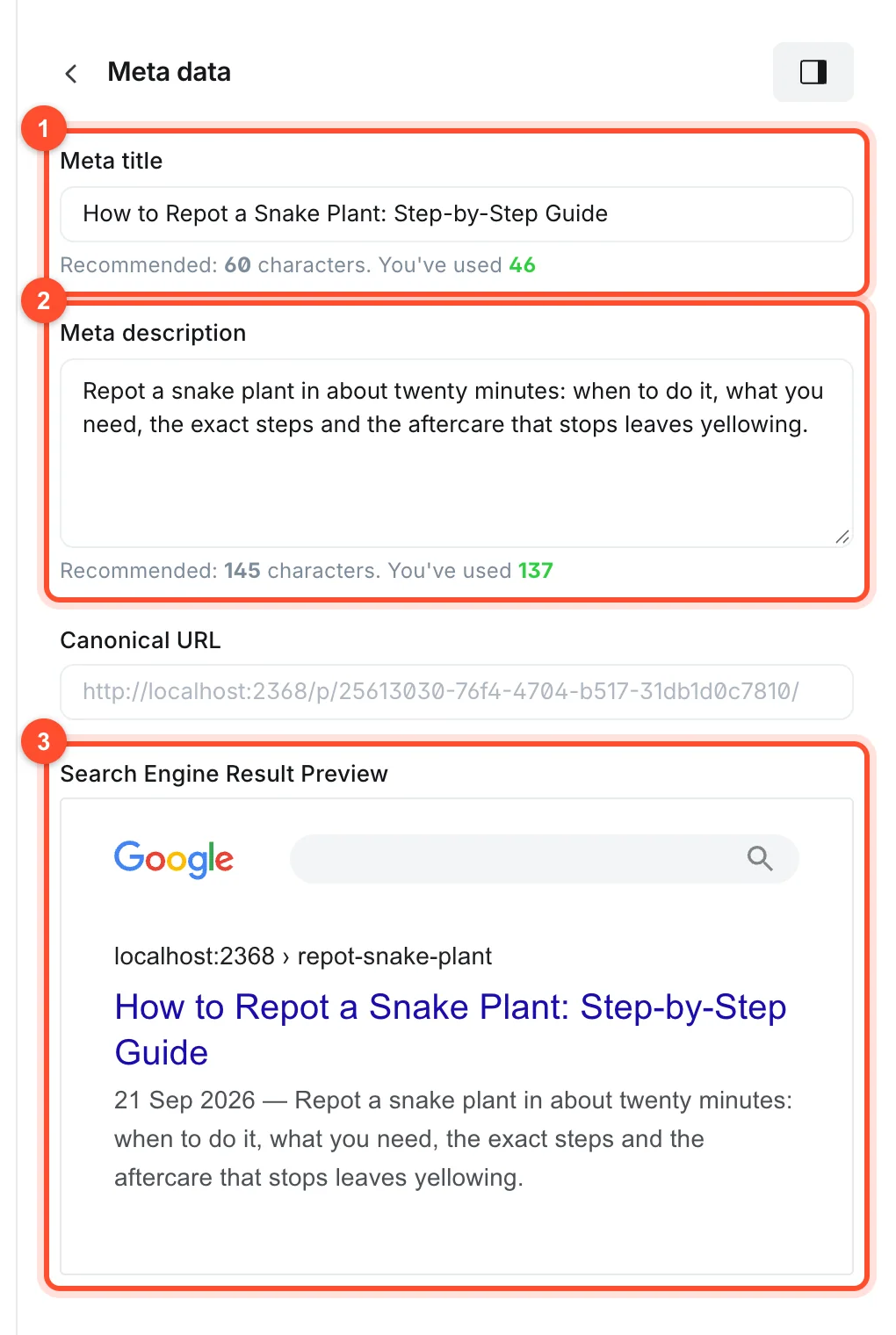
The description should say what the reader will get, for example: "Repot a snake plant in about twenty minutes: when to do it, what you need, the exact steps and the aftercare that stops leaves yellowing."
Step 8: Add images with alt text
Include original photos or diagrams where they help, and write alt text describing what each shows. Compress large files before uploading. See our Ghost image guide for size and format advice.
Step 9: Link the post into your site
Internal links tell search engines which pages matter and help readers keep going.
- Link from the new post to two or three related posts, using descriptive link text.
- Link to the new post from older posts that mention the topic. This is the step most people forget, and it is where a lot of the benefit comes from.
- Add a relevant tag so the post appears on a topic page. See how to use tags in Ghost.
Step 10: Answer the follow-up questions
A short question-and-answer section at the end answers the follow-up questions a searcher has. Take
them from "people also ask". Write each question as a heading and answer it in two or three
sentences. Ghost's toggle card (/toggle) is a neat way to present them if you prefer collapsible
answers.
Step 11: Publish, then request indexing
Publish, open the live page in a private window and check it. In Search Console, paste the URL into the inspection bar and choose Request indexing. See the first-post walkthrough for the full publishing flow.
Step 12: Review after a month
Check Search Console for the post. If it shows impressions but few clicks, rewrite the title and description. If it ranks on page two, improve the content, add missing sections and update it, as described in how to edit a published post.
Habits that quietly hurt
- Publishing thin posts of a few hundred words on a topic that needs depth.
- Targeting the same phrase on several posts, so they compete with each other.
- Ignoring old posts instead of updating them.
- Writing for search engines in an unnatural voice.
- Never linking between your own posts.
FAQ
How long should an SEO blog post be?
Long enough to cover the topic fully. Look at the top results for your phrase as a guide. For tutorials that is often 800 to 1,800 words, but there is no magic number.
How often should I publish to grow traffic?
Consistency matters more than volume. One good post a week, or even every two weeks, beats a burst of rushed posts followed by silence.
How many keywords should I use in a post?
Focus each post on one main topic and let related terms appear naturally. There is no keyword density target worth chasing.
How long does it take to rank?
New sites often take three to six months to see meaningful search traffic, sometimes longer in competitive topics. Publishing steadily and updating posts shortens it.
Do tags help SEO in Ghost?
Yes, indirectly. Tags create topic pages and internal links. Use a small number of meaningful tags rather than a new tag for every post.
A fast, reliable host helps every page you publish. See our plans or start your blog.